
Is Your Business Ready for AI Agents? A 10 Point Readiness Checklist
Probably more ready than you think, but likely missing two or three things that will decide whether your first AI agent succeeds or stalls. The companies seeing results from AI agents aren't the ones with the biggest budgets. They're the ones that picked the right workflow, cleaned up the data behind it, and gave the agent clear authority to act. This checklist shows you exactly where you stand.
Quick Answer: A business is ready for AI agents when it has a high-volume, repeatable workflow to start with, accessible and reasonably clean data, systems with APIs the agent can connect to, a clear owner, defined success metrics, and guardrails for when a human needs to step in. If you can check off at least 7 of the 10 points below, you're ready to deploy a first agent. If not, the gaps tell you exactly what to fix first.
Key Takeaways:
62% of organizations are at least experimenting with AI agents, but only 23% are scaling them anywhere in the business, according to McKinsey's State of AI 2025 survey.
Gartner predicts that over 40% of agentic AI projects will be canceled by the end of 2027 due to rising costs, unclear business value, or weak risk controls.
Most AI agent failures trace back to readiness gaps, not model capability: unclear workflows, messy data, disconnected systems, and no defined owner.
The best first agent targets a high-volume, rules-heavy workflow with a measurable outcome, like lead response, intake, scheduling, or invoice processing.
Readiness isn't all or nothing. You can deploy a focused agent while you close the bigger gaps.
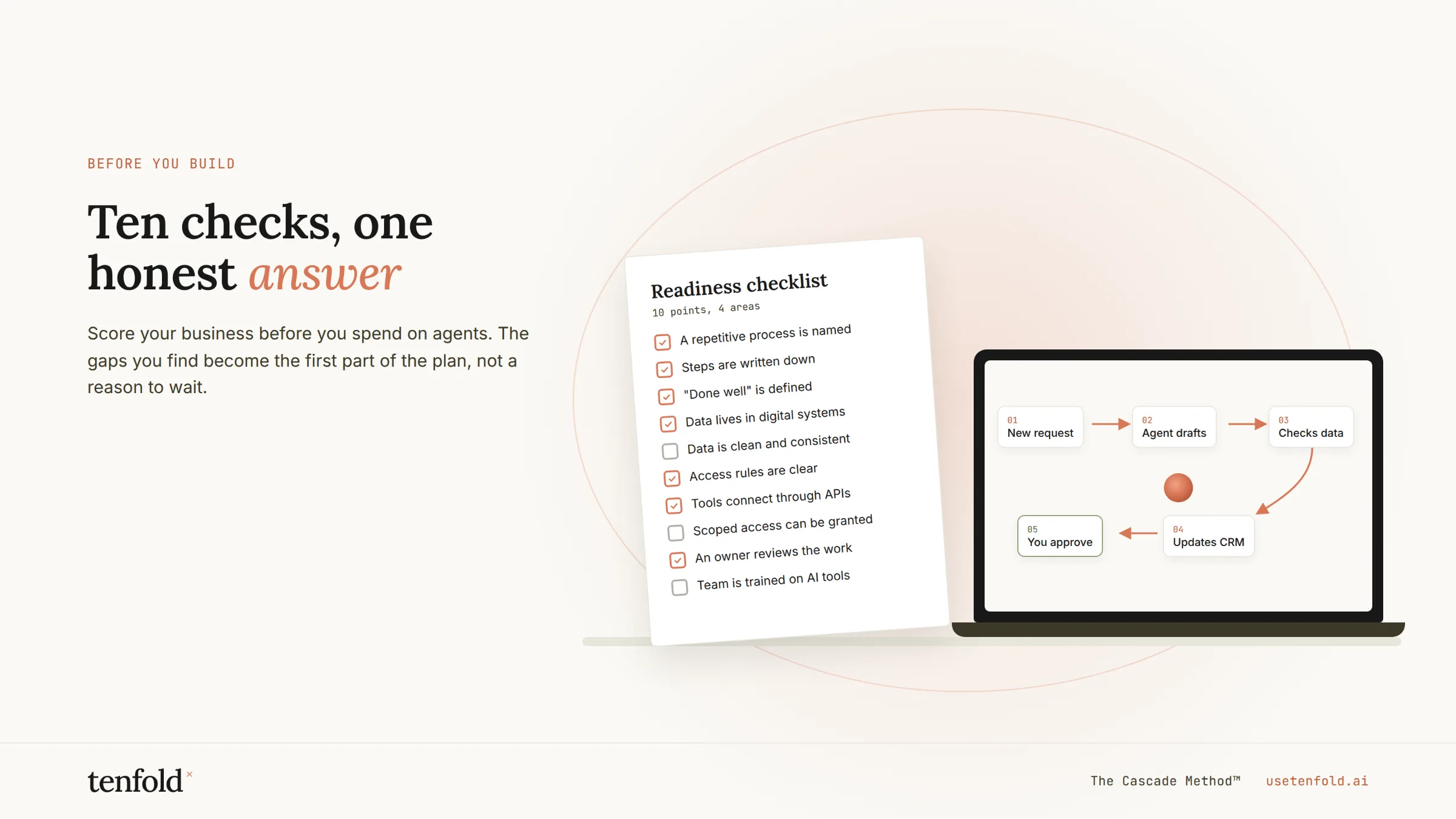
Why Readiness Matters More Than the Technology
AI adoption is no longer the hard part. McKinsey's State of AI 2025 survey found that 88% of organizations now use AI in at least one business function, up from 78% a year earlier. 62% are at least experimenting with AI agents.
But experimenting and getting results are two different things. Only 23% of organizations report scaling an AI agent anywhere in the business, and in any single function, no more than 10% say they're scaling agents. Nearly two-thirds of organizations haven't started scaling AI across the enterprise at all.
Gartner's outlook is even more direct. The firm predicts that over 40% of agentic AI projects will be canceled by the end of 2027, citing escalating costs, unclear business value, and inadequate risk controls. Gartner has also warned that organizations will abandon 60% of AI projects that aren't supported by AI-ready data.
None of those failure reasons are about what the AI can do. They're about whether the business is set up to let it do the work.
The bottleneck isn't AI capability. It's readiness.
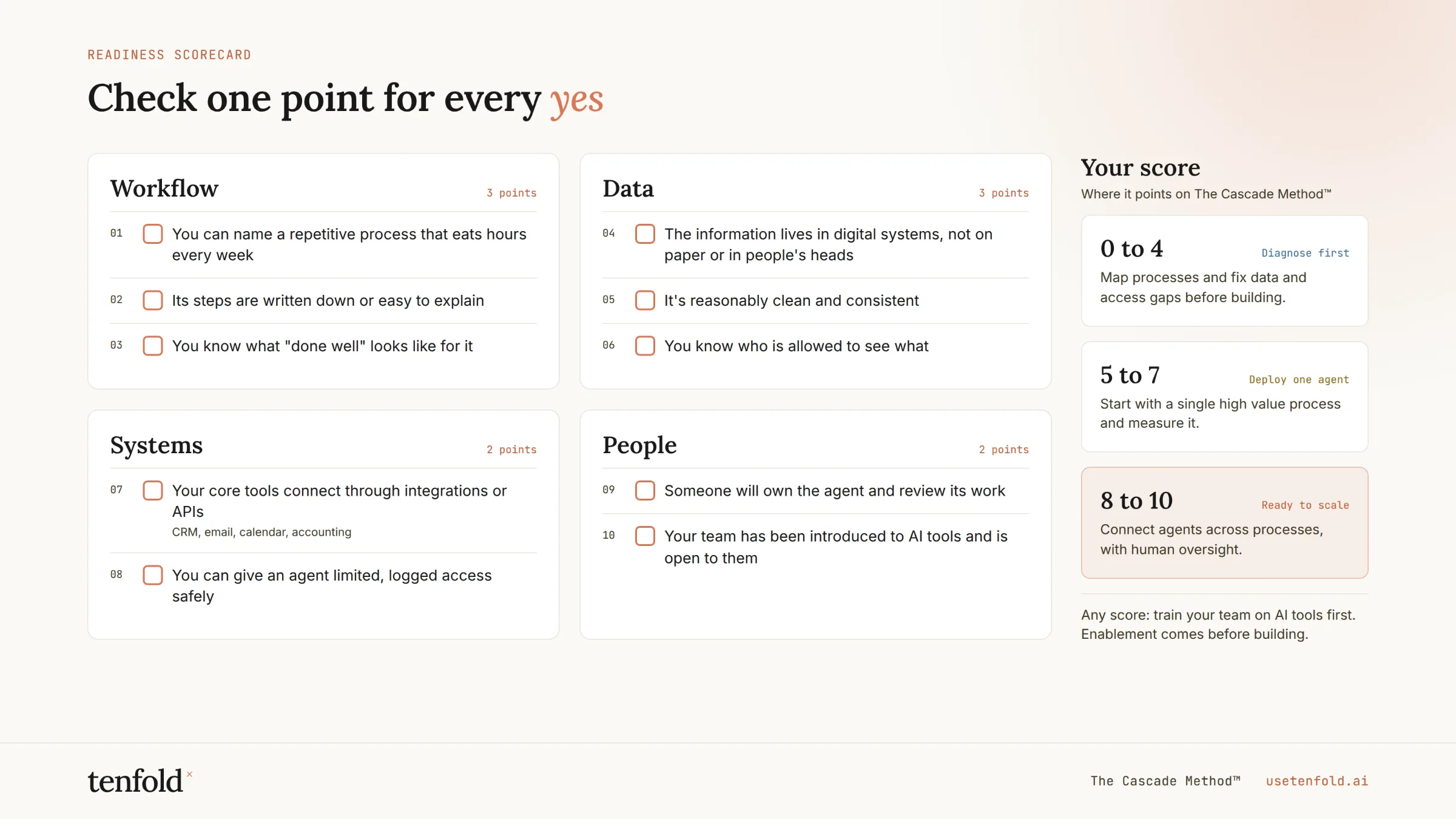
The 10 Point AI Agent Readiness Checklist
Score yourself honestly. Each point is a yes or no.
1. You've identified a specific workflow, not a general goal
"Use AI to be more efficient" isn't a starting point. "Respond to every inbound lead within 2 minutes and book qualified ones on a sales rep's calendar" is. AI agents succeed when they own a defined workflow with a clear start, end, and outcome.
2. The workflow is high-volume and repeatable
The best first agents handle work that happens dozens or hundreds of times a week and follows a recognizable pattern: lead follow-up, client intake, appointment scheduling, document collection, invoice processing, ticket triage. Rare, one-off tasks are poor candidates for a first deployment.
3. You can describe how the work is done today
If your team can't walk through the current process step by step, including the exceptions, an agent can't learn it either. You don't need a formal process map, but you do need someone who can explain what "done right" looks like.
4. The data the agent needs is accessible
Agents need to read and write information: customer records, schedules, documents, pricing, policies. If that data lives in someone's inbox, a shared drive with no structure, or in people's heads, the agent will be working blind.
5. Your data is reasonably clean
It doesn't need to be perfect. But duplicate records, outdated contact information, and inconsistent fields will cause an agent to make the same mistakes your team already works around manually. A focused cleanup of the data tied to your first workflow is usually enough.
6. Your core systems have APIs or integrations
The agent has to connect to the tools where work actually happens: your CRM, calendar, email, phone system, practice management or ERP software. Most modern cloud platforms support this. Legacy on-premise systems with no integration options are a real blocker and should be flagged early.
7. Someone owns the outcome
Every successful AI agent deployment has a named business owner who's accountable for results, makes decisions about how the agent should behave, and reviews performance. Without an owner, agents drift, and nobody notices until something breaks.
8. You've defined what success looks like
Pick two or three metrics before you launch: response time, hours saved, conversion rate, error rate, cost per transaction. Capture the baseline now. Without a before-and-after comparison, you won't be able to prove ROI or decide whether to expand.
9. You've set guardrails and escalation rules
Decide upfront what the agent can do on its own, what needs human approval, and when it should hand off to a person. Clear guardrails are what make it safe to give an agent real authority, and they're the risk controls Gartner flags as missing in many failed projects.
10. Your team is on board
Agents change how people work. If your team sees the agent as a threat, they'll work around it. If they see it as taking the repetitive work off their plate, they'll help it improve. Involve the people who do the work today in designing how the agent will do it tomorrow.
How to Score Your Results
8 to 10 checks: Ready to deploy. You have the foundation for a first AI agent. Pick your highest-volume workflow and move to a scoped pilot with clear metrics.
5 to 7 checks: Ready with focused prep. You can deploy, but close the specific gaps tied to your first workflow first. That usually means a data cleanup sprint, an integration, or naming an owner. This typically takes weeks, not months.
4 or fewer checks: Build the foundation first. Start by documenting one workflow, consolidating its data, and confirming your systems can connect. An AI readiness assessment can map this out quickly so you're not guessing.
The Most Common Readiness Gaps (and How to Close Them)
Across the businesses we work with, the same gaps show up again and again.
No clear starting workflow. Fix it by listing your top five most repetitive, time-consuming processes and scoring each on volume, rule clarity, and business impact.
Data scattered across tools. Fix it by consolidating only the data your first workflow needs, not your entire business.
Nobody owns it. Fix it by assigning one business owner (not IT by default) who feels the pain the agent is solving.
No baseline metrics. Fix it by measuring the current process for two to four weeks before launch.
Fear of losing control. Fix it by starting with human-in-the-loop approval on key actions, then expanding the agent's authority as it earns trust.
At Tenfold, we've found that the businesses seeing the fastest results aren't the ones with the most sophisticated technology. They're the ones that have clearly defined which workflows they want to hand off, and have given the agents the access and authority to actually run them.
Summary
Most businesses are already experimenting with AI, but McKinsey's data shows only 23% are scaling AI agents, and Gartner expects more than 40% of agentic AI projects to be canceled by 2027. The difference between the companies that succeed and the ones that stall is readiness: a clear workflow, accessible data, connected systems, an accountable owner, defined metrics, guardrails, and a team that's on board. Score yourself against these 10 points, close the gaps tied to your first workflow, and deploy from there. The constraint isn't what AI can do. It's whether your business is ready to delegate.
Tenfold helps organizations assess their AI readiness, choose the right first workflow, and implement AI agents that deliver measurable results.
Frequently Asked Questions
Q: How do I know if my business is ready for AI agents?
A: Your business is ready when you have a specific, high-volume workflow to automate, accessible and reasonably clean data, systems that can integrate with the agent, a clear owner, defined success metrics, and escalation rules. Scoring 7 or more on the 10 point checklist above is a strong signal you're ready for a first deployment.
Q: Do I need perfect data before deploying an AI agent?
A: No. You need clean, accessible data for the specific workflow the agent will run, not your entire business. A focused cleanup of the records and fields tied to that workflow is usually enough to start.
Q: What's the best first workflow for an AI agent?
A: Look for work that's high-volume, follows clear rules, and has a measurable outcome. Common first workflows include lead response, client intake, appointment scheduling, document collection, and invoice processing.
Q: Why do so many AI agent projects fail?
A: Gartner attributes most agentic AI project cancellations to escalating costs, unclear business value, and inadequate risk controls. In practice, that usually traces back to unclear workflows, poor data, no defined owner, and no baseline metrics to prove value.
Q: How long does it take to get ready for AI agents?
A: Businesses that score 5 to 7 on the checklist can usually close their gaps in a few weeks by focusing only on what the first workflow needs. Businesses starting from scratch may need a short assessment phase to document workflows and connect systems before deploying.
Sources used (for fact checking, not for publishing): McKinsey, The State of AI in 2025 · Gartner press releases on agentic AI project cancellations (June 2025) and AI-ready data (Feb 2025), cited from memory, verify before publishing
